 Afterglow
What’s left when the noise goes.
Afterglow gives YouTube a warm, quiet look and takes out what is built to hold you there: Shorts, spam, filler videos and autoplay previews. Add your own words to hide anything else. Your subscriptions stay, sorted into folders.
Free for good, with the Sunset theme. Pro is free for 14 days, no card needed.
Calm by design, not by willpower
Afterglow works on the page you already use. Nothing to learn, nothing to log into.
Your own filter list
Type any word or phrase, such as a name, a game or a trend you are tired of, and every video with it in the title disappears from your feed. The list is yours and stays on your computer. Part of Pro.
A feed with the noise taken out
Shorts, sponsored cards, “free giveaway” spam, clickbait and AI-voice filler are filtered out before you see them. You can add your own words to the list.
Folders instead of a wall of videos
Your feed is sorted into Subscriptions and Recommended, and with Pro also by topic: Work, Learning, Knowledge, Health, News and Leisure. Open the folder you are in the mood for.
Sixteen themes, all from the same hour
Warm and low-contrast, made for evenings. Sunset is free. The other fifteen, from Wine and Honey to Ocean and Graphite, are part of Pro.
Nothing plays by itself
No video previews when you hover, no end-screen suggestions, no comment pile-ons. Comments are hidden, or only the author’s, as you choose.
Black-and-white video
One switch turns thumbnails and video grey while the rest of the page keeps its colour. Colour is a big part of what makes a thumbnail grab you. Without it, a video has to be worth watching on its own. Many people use it to feel less pulled, to wind down in the evening, or to listen rather than stare.
Private by construction
Everything happens inside your browser. We do not receive your watch history, your searches or the pages you open.
See it on a feed
Screenshots of the extension on a sample feed. The videos are made up, so nobody’s channel is shown.
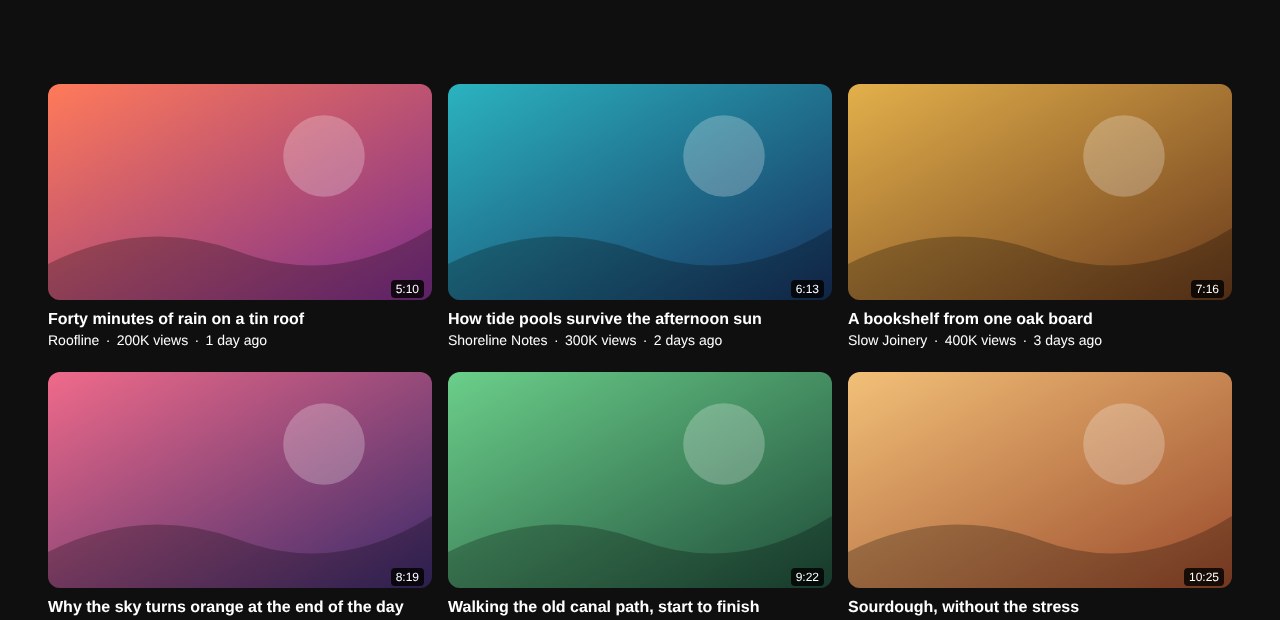
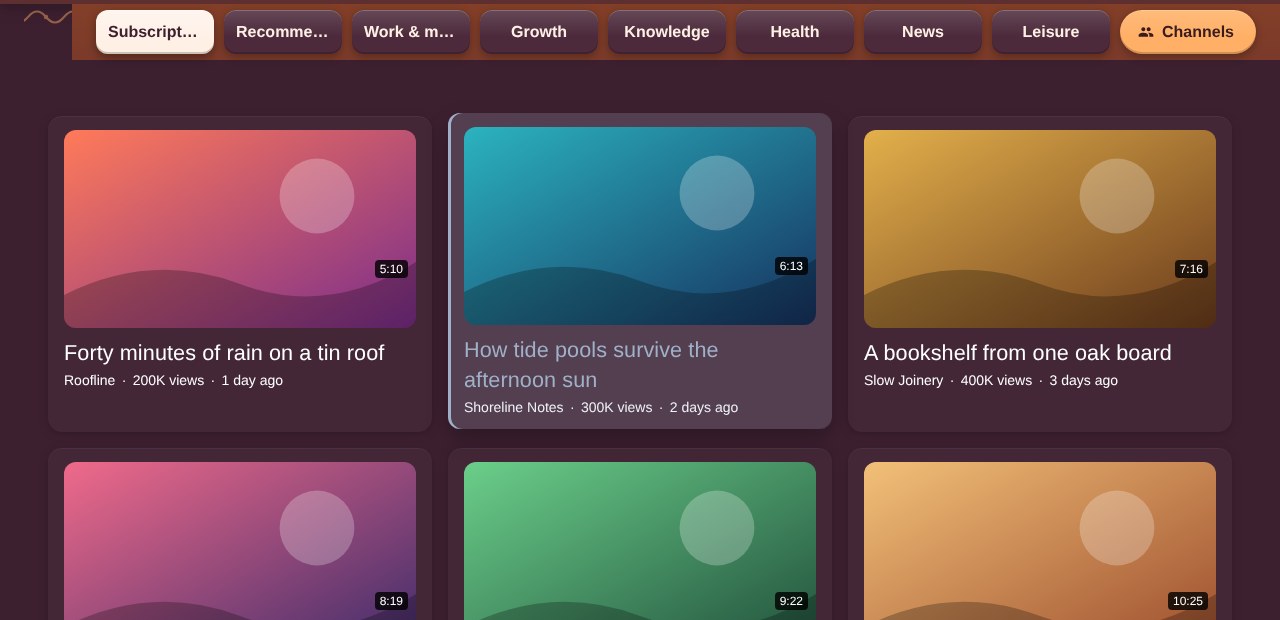
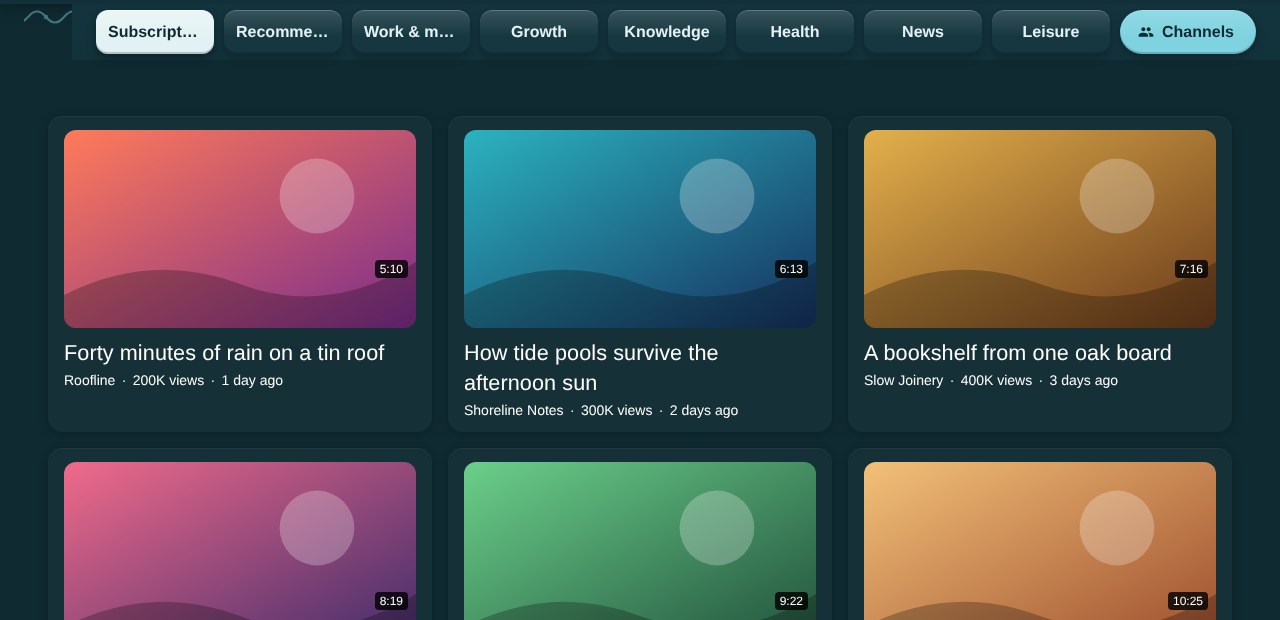
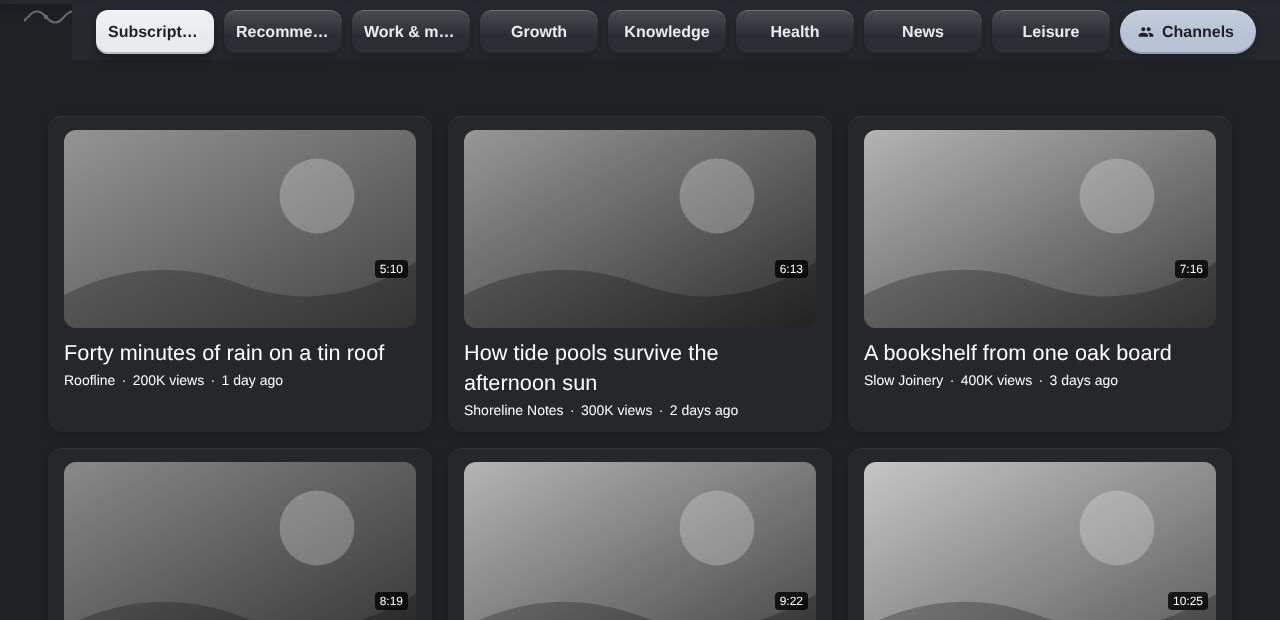
YouTube, and YouTube with Afterglow
The site stays the same. What changes is what you see and how it feels.
| Feature | Regular YouTube | With Afterglow |
|---|---|---|
| Shorts | Rows of them in the feed | Removed |
| Sponsored and spam cards | Mixed in with videos | Filtered out |
| Clickbait and AI-voice filler | Shown as any other video | Filtered out |
| Words you never want to see | Cannot be set | Your own filter list (Pro) |
| Hover previews | Video starts playing on its own | Off |
| Look | White or black, high contrast | 16 warm themes |
| Feed layout | One endless grid | Folders: Subscriptions, Recommended, topics (Pro) |
| Video colour | Always full colour | Optional black and white (Pro) |
| Comments | Always open | Hidden, or only the author’s |
| After a video ends | Suggestions and autoplay | A calm end screen |
| Create and Studio buttons | Always there | Hidden in Viewer mode |
Afterglow is in active development. New features and fixes arrive as updates, and everything on this page is only what exists today.
A theme made for you
Want YouTube to look like a pixel-block world, a medieval hall, a favourite anime or your own brand colours? Describe it and we will design a theme for you.
Custom theme
Made to your description. You get the colours, the mood and the details, set up as a theme in your Afterglow.
- Tell us the style, the colours and any words that describe it
- We reply with a preview and the price before you pay anything
- We use colour and mood only. Protected artwork, logos and characters are not copied
Free keeps the quiet. Pro adds the choices.
The cleaning is free and stays free. Pro is for people who want more ways to arrange it.
| What you get | Free | Pro |
|---|---|---|
| Sunset theme | Yes | Yes |
| Shorts, spam and filler videos removed | Yes | Yes |
| Viewer modeHides Create, Studio and channel buttons | Yes | Yes |
| Thumbnails on or off | Yes | Yes |
| Subscriptions and Recommended folders | Yes | Yes |
| Calm end screen | Yes | Yes |
| Fifteen more themes | No | Yes |
| Topic folders and a News folder | No | Yes |
| Black-and-white video | No | Yes |
| Your own keyword filter list | No | Yes |
Simple pricing
Try Pro for 14 days without a card. When it ends you keep the free version, and nothing is charged unless you subscribe.
Free
The quiet feed, in the Sunset theme.
- Shorts, spam and filler removed
- Viewer mode and calm end screen
- Subscriptions and Recommended folders
Pro
- Everything in Free
- Fifteen more themes
- Topic folders and a News folder
- Black-and-white video
- Your own keyword filter list
Prices in euros. Taxes are added at checkout where they apply. Payment is handled by Paddle, our reseller. Cancel any time, and ask for a full refund within 14 days of paying. Refund policy
Ready in a minute
Add it to Chrome
One click from the Chrome Web Store. No account, no sign-up.
Open YouTube
The Sunset theme and the cleaning start straight away. Sorted folders appear at the top of your feed.
Make it yours
Click the Afterglow icon to change theme, text size or comments. Pro starts a 14-day trial when you first use it.
Questions
What does Afterglow see? Is my data safe?
Video titles on the page, only to filter and sort them on your own computer. Your history, searches and settings are never sent to us. The one thing that reaches our server is your licence key, when you activate Pro.
What happens when the free trial ends?
You keep the free version for good. Pro features, like the other themes and topic folders, switch off until you subscribe. Nothing is charged automatically, because the trial needs no card.
How do I cancel, and can I get a refund?
Use the link in your Paddle receipt, or email support@afterglowfeed.com. You keep Pro until the end of the period you paid for. Within 14 days of paying you can ask for a full refund, no questions.
Is Afterglow made by YouTube?
No. Afterglow is built for YouTube’s website and changes how it looks and what it shows in your browser, but it is an independent project. YouTube and Google did not make it and do not endorse it.
Why would I want black and white?
Bright colour is one of the first things that pulls the eye in a feed. In grey, a video has to be interesting by itself, so many people find it easier to put the phone-style “one more” habit down, to wind down before bed and to listen instead of stare. It is a personal tool, not a medical one, and you can switch it off at any time.
Which browsers and devices does it work on?
Desktop Chrome today. Other Chromium browsers may work, but we test on Chrome. There is no phone or TV version yet.
Something still shows that shouldn’t. What do I do?
YouTube changes its pages often, and Afterglow is updated to follow. Write to us with a link or a screenshot and we will fix it.
Can I use it on more than one computer?
Yes, on your own devices. The licence is personal and cannot be shared.
Let the feed go quiet.
Afterglow is about to open on the Chrome Web Store. Leave your email address on a message to us and we will write to you once, on launch day.